Organizations invest significant time and resources implementing enterprise systems like Microsoft Dynamics 365. Deployments often take months and involve process redesign, data cleanup, user training, and integration work. The expectation is straightforward: create a single source of truth for the organization.
But what happens when the system says one thing and operations see something completely different?
An Ontario manufacturer opens D365 and sees 240 calibrated torque tools available across facilities. Maintenance teams physically locate only 198. A logistics operation in Mississauga shows 22 trailers available for loading, while yard teams find 17. In healthcare environments, infusion pumps or mobile equipment may appear available in the system even though staff spend valuable time searching across departments.
The ERP system is not necessarily wrong. The issue is often much more subtle.
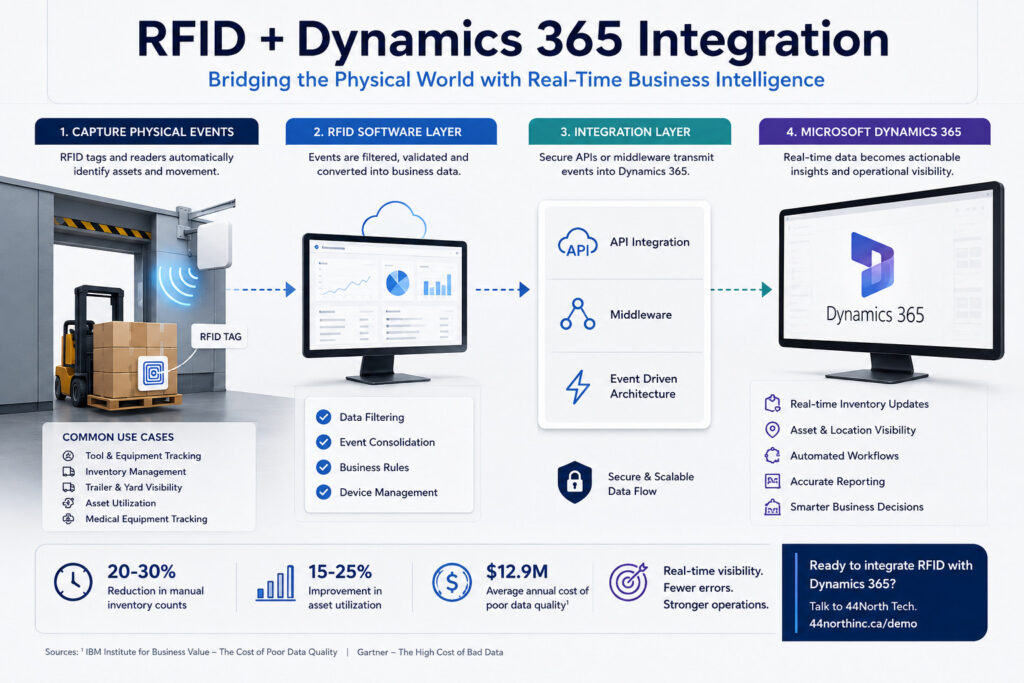
According to IBM Institute for Business Value poor data quality costs organizations an average of $12.9 million annually, while Gartner
estimates poor information quality costs organizations approximately $15 million each year through inefficiencies and incorrect decisions.
Many assume these problems begin with software, databases, or integrations. In reality, they often begin on the floor itself. Equipment moves between departments, tools are borrowed, inventory is relocated, and assets are temporarily reassigned. By the time updates reach the system, operational reality may have already changed.
Consider a common sequence:
8:00 AM → Equipment moved between locations
11:30 AM → Inventory relocated temporarily
2:15 PM → Asset assigned to another department
4:00 PM → Manual update entered into D365
Next Morning → Reports generated for management
Every individual update may be correct. The challenge is that physical operations often move faster than the system recording them.
This creates a question many organizations never ask:
How much of your D365 environment reflects what is actually happening right now?
Why Enterprise Systems Struggle With Physical Movement Data
Microsoft Dynamics 365 was designed to be a powerful enterprise platform capable of managing procurement, work orders, financials, inventory records, and operational workflows. It performs exceptionally well at processing transactions and creating structure around business activities. The challenge is that enterprise systems do not automatically observe physical events. They depend on information being entered correctly and at the right time.
Research from Microsoft Dynamics 365 consistently emphasizes the importance of connected data environments because disconnected information creates operational blind spots. In many organizations, those blind spots appear where physical activity and digital systems meet.
Take a typical manufacturing operation in Ontario. A tool crib issues a piece of equipment to production. Later in the day, maintenance temporarily borrows it for inspection. The equipment is then relocated to another area because of an urgent production requirement. By the end of the day, the physical asset has changed locations multiple times, while D365 may still show its original assignment.
The same pattern exists in healthcare and logistics environments. A medical device can move from one patient unit to another several times during a shift. A trailer arriving at a yard in Mississauga may be reassigned to another dock due to changing loading schedules. These are not process failures. They are simply realities of operational environments.
The issue becomes more significant as organizations scale. A single warehouse may manage thousands of assets. A hospital network may have equipment spread across multiple sites. Large manufacturers can operate across Ontario, Alberta, and the United States simultaneously. Small timing gaps that seem insignificant at one location become magnified across multiple facilities.
This creates what many operations teams describe as a physical visibility gap: the period between an event happening in the real world and that same event being reflected inside the ERP system.
The challenge is not that D365 lacks information.
The challenge is whether the information arrives quickly enough to support decisions being made today rather than yesterday.
Common Methods Organizations Use Before Looking at RFID
Before organizations begin discussing RFID integration with Dynamics 365, most try to solve visibility issues using process improvements or additional controls. Some approaches work temporarily, but many become difficult to maintain as operations scale.
The most common approach is increasing manual audits. Teams perform weekly or monthly inventory counts to reconcile differences between physical assets and system records. While effective in identifying discrepancies, the process often consumes significant time. In large warehouses or manufacturing facilities, inventory counts can involve dozens of employees and hundreds of labor hours annually.
Another common method is barcode expansion. Organizations add more barcode labels and require staff to scan equipment at every movement point. This improves accountability but still relies heavily on human behavior. If a scan is missed during a busy shift or equipment is moved quickly between locations, discrepancies remain.
Some organizations also introduce stricter process controls:
• Mandatory check in and check out procedures
• Additional approval workflows
• Sign out sheets for shared equipment
• Daily reconciliation reports
• Manual exception handling
These methods often improve visibility initially, but they introduce another challenge: operational friction.
According to MHI Annual Industry Report supply chain leaders continue increasing investment in automation because manual processes become increasingly difficult to sustain as operations become larger and more dynamic.
The challenge is not necessarily process discipline. Even highly disciplined organizations experience gaps when physical environments move quickly. In manufacturing, a production supervisor focused on avoiding downtime may not stop operations to update records immediately. In healthcare, clinical staff focused on patient care are unlikely to prioritize equipment movement updates during busy periods. In logistics environments, loading schedules and delivery windows change continuously.
The result is that many organizations eventually reach a point where they ask a different question:
Instead of asking people to update systems more often, can parts of the process be captured automatically?
Where RFID Starts Entering the Dynamics 365 Conversation
This is usually where organizations begin asking a different question: instead of asking people to update systems more frequently, can physical activity be captured automatically?
RFID is increasingly being evaluated because it addresses one challenge many enterprise systems face: recording physical movement as it happens. RFID readers can automatically identify tagged assets at locations such as:
• Warehouse doors
• Tool cribs
• Production areas
• Loading docks
• Storage rooms
Rather than depending entirely on manual updates, asset movement creates digital events that can be synchronized into business systems.
The objective is not generating more information. Most organizations already have enough data.
The objective is reducing the gap between what is happening physically and what appears inside Dynamics 365.
What Does RFID Integration with Dynamics 365 Actually Look Like?
The word integration often creates the impression that organizations need to replace systems or rebuild ERP environments. In reality, most RFID deployments connect into Dynamics 365 using existing integration layers and typically follow a phased approach.
The goal is straightforward: capture physical events and make them available inside D365.
There are several common methodologies organizations use:
1. API-Based Integration
This is one of the most common approaches for modern deployments.
RFID platforms collect information from readers and pass events through APIs into Dynamics 365.
Example:
RFID Reader → RFID Software Layer → API → Dynamics 365
Physical event:
“Tool left warehouse”
D365 update:
“Asset status changed from Available to In Use”
Benefits:
• Near real-time updates
• Reduced manual entry
• Works with existing workflows
• Scalable across multiple facilities
2. Middleware Integration
Many enterprises already operate systems beyond D365 including:
• SAP
• Oracle
• Warehouse Management Systems
• Asset Management Systems
• Manufacturing Execution Systems
Middleware acts as a translation layer between RFID hardware and business applications.
Typical flow:
RFID Reader → Middleware → D365 + Other Enterprise Systems
This approach allows organizations to avoid changing ERP logic while keeping multiple systems synchronized.
3. Event Driven Architecture
Larger enterprises increasingly use event-driven environments where RFID creates operational events.
Examples:
• Trailer entered yard
• Equipment left tool crib
• Asset entered maintenance area
• Inventory arrived at dock door
These events can automatically trigger actions inside Dynamics 365 such as:
• Updating inventory records
• Creating work orders
• Sending notifications
• Triggering approval workflows
4. Pilot First Methodology
Most successful RFID projects do not start enterprise-wide.
Organizations typically begin with:
✓ One facility
✓ One process
✓ One asset category
Examples:
• Tracking tools in manufacturing
• Monitoring mobile medical devices
• Trailer visibility at logistics yards
The objective is proving operational value before expanding across additional workflows.
For many organizations, the discussion is no longer “Can RFID connect into Dynamics 365?”
The better question is:
Which integration approach aligns best with our operations, infrastructure, and long-term digital roadmap?
If you’re evaluating RFID integration with Dynamics 365, book a consultation to discuss potential approaches.